
Thursday, 9 January 2014

Wednesday, 8 January 2014

Tuesday, 7 January 2014
Forget Kickstarter: How To Crowdfund From Your Own Website

by

Christian Cawley
Christian Cawley is a freelance writer from the United Kingdom with seven years' experience in technical support across a range of device platforms and operating systems. Follow his updates on Twitter:@thegadgetmonkey
ccawley@makeuseof.com
Crowdfunding has taken off in a big way in the past few years. It’s easy to see why, as the Internet offers a way for many likeminded people to club together. But you don’t need to use a service like Kickstarter if you’re already running your own popular website…
Read full article in
http://www.makeuseof.com/tag/forget-kickstarter-crowdfund-website/
'via Blog this'
Travel the World from Your Classroom: Free iPad Apps for Virtual Field Trips | Edutopia
in edutopia

Image credit: Veer
Not every school has the resources necessary to take their students on an airplane . . . or spaceship. The iPad can bring the world to your students' fingertips in ways never before possible. Many national parks and museums have apps designed for onsite visitors. These navigational tools are also great for classrooms who can't make the trip. In fact, a variety of free apps can be used as virtual field trips so that children can travel the world from your classroom!
Image credit: Veer
Not every school has the resources necessary to take their students on an airplane . . . or spaceship. The iPad can bring the world to your students' fingertips in ways never before possible. Many national parks and museums have apps designed for onsite visitors. These navigational tools are also great for classrooms who can't make the trip. In fact, a variety of free apps can be used as virtual field trips so that children can travel the world from your classroom!
National Parks by National Geographic
National Parks by National Geographic is full of breathtaking pictures and information on National Parks including Acadia, Mount Rainier, Yellowstone and Zion. With details on weather conditions and interactive maps, this app is a great resource for bringing the National Parks to your classroom.
Gettysburg
For a virtual tour of the Gettysburg Battlefield, the Gettysburg Battle app can be used in classrooms commemorating the 150th anniversary of this Civil War battle. With information on a variety of sites at Gettysburg, including video clips and audio, you'll find plenty to support students' exploration of this historic site.
Getty Museum
The Life of Art app designed by the Getty Museum focuses on four items from their collection. With detailed information on each object, students can manipulate the artifacts by spinning high-quality three-dimensional images and tapping to learn more about the history and characteristics of each item.
NASA Earth Now
If you're looking for a trip on a more global scale, NASA Earth Now lets users view the Earth through a different lens. Whether you want a visual of daily temperatures or want to compare sea level in different hemispheres, this app can spark a conversation without a trip to Cape Canaveral.
Timeline - Art Museum
A trip to the National Gallery or Sistine Chapel might be out of the question, butTimeline - Art Museum will bring the works of famous artists to your students' fingertips. This app includes a variety of works including Rembrandt and Lichtenstein, to name a few.
Sphere
Formerly known as TourWrist, Sphere is an exciting way to bring the world back to your students. This app allows users to take a 360-degree panoramic photograph using an iPad or iPhone. Not only can you view user-uploaded pictures of the Washington Monument or Lincoln Memorial, but it's also a great way to document your own travels and share with students. Children can stand holding their iPad screen in front of them and turn in a circle to see the sights!
American Museum of Natural History's Creatures of Light
Although this exhibit is no longer on view at the American Museum of Natural History, the Creatures of Light app can bring the information from the show to your class. Students can explore nature's bioluminescence on land and in the sea with clear pictures, interactive widgets and a variety of videos.
Trees Pro HD Nature Mobile
If a trip to a forest is out of the question for your students, check out Trees Pro HD Nature Mobile. With information on a variety of tree species located in North America, the high-quality images and easy-to-read graphics will help students distinguish between different trees in the great outdoors.
Congressional Record
The Congressional Record app is a fantastic resource for teachers who can't take their students to the floor of Congress. Up-to-date information as well as archived text paired with some CSPAN clips can bring the United States Senate and House of Representatives straight to America's future voters.
'via Blog this'
Monday, 6 January 2014
Classroom Aid | Connecting dots of digital learning (or an Open Source Paradise for Teachers)
Sweet music to an EdTech Teacher's ears !
Classroom Aid
CONNECTING DOTS OF DIGITAL LEARNING
.gif)
'via Blog this'
Classroom Aid
CONNECTING DOTS OF DIGITAL LEARNING
Saturday, 4 January 2014
Coursera Blog • How to earn 40 certificates: An interview with China's MOOC Superstar
in COURSERA Blog,
Interview conducted by and translated from original Chinese by Coursera team member, Eli Bildner.
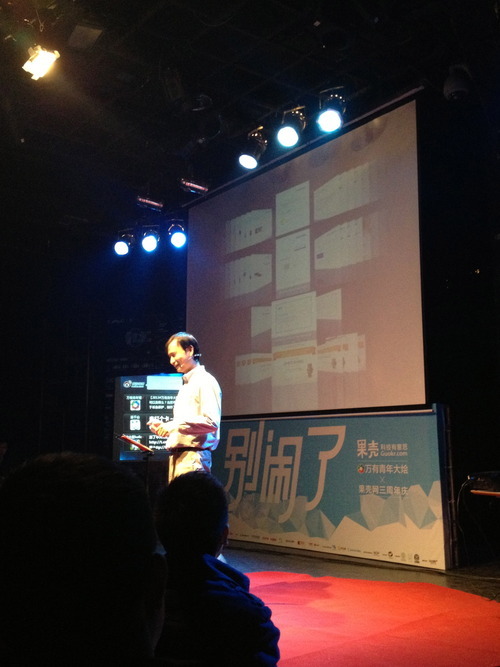

Guokr.com’s “Ten-thousand Youth Conference” bore all the hallmarks of a rock concert: hundreds of effervescent twenty-somethings, a flashy A/V setup, migrating packs of autograph-seekers. But at this gathering, the “rock stars” signing autographs were, in fact, tenured professors from greater China’s top universities, and the animated audience was comprised of MOOC fans from across the country.

Cryptography:
starts 1/6/2014


Model Thinking:
starts 2/3/2014


Hetero Parallel Programming:
starts 1/6/2014

'via Blog this'
Interview conducted by and translated from original Chinese by Coursera team member, Eli Bildner.
Guokr.com’s “Ten-thousand Youth Conference” bore all the hallmarks of a rock concert: hundreds of effervescent twenty-somethings, a flashy A/V setup, migrating packs of autograph-seekers. But at this gathering, the “rock stars” signing autographs were, in fact, tenured professors from greater China’s top universities, and the animated audience was comprised of MOOC fans from across the country.
I met a number of remarkable people during the Guokr conference (as a Coursera translation partner, Guokr has translated an impressive array of courses into Chinese). I met Professor Benson Yeh, of National Taiwan University, whose course on probability featured the first MOOC-based multiplayer gaming platform. I met Zi Lingzi, at 14 years old the youngest member of Guokr’s MOOC Academy. And then there was Wang Zhen. When the emcee called him up to the stage, the audience erupted in applause. I’d never heard of him, which clearly signified by remove from the China MOOC loop; Wang Zhen had already achieved local renown as a MOOC superstar, having earned 40 credentials (over 30 of them from Coursera).
Earlier this month, we had a chance to connect with Wang Zhen via email.
Coursera: Can you tell us a bit about yourself?
Wang Zhen: My name is Wang Zhen. I was born in Nanyang, in Hubei Province, in 1984. In 2002, I entered Beihang University, in Beijing, to study applied physics, and in 2009 received my master’s in computational physics from Beihang as well. Now, I live in Beijing’s Haidian District, where I work on computational modeling for a manufacturing business.
Coursera: What originally inspired you to start taking MOOCs? What was the first course you completed?
Wang Zhen: Ever since I was small I’ve always been a very curious person, but even having spent so many years in school I’d never found a relaxed, self-directed learning environment. If MOOCs hadn’t appeared, it’s possible that my curiosity would have remained buried forever. Fortunately, in 2011 I found Stanford’s three online open courses: Artificial Intelligence, Machine Learning, and Databases. Conveniently, at that time I was pretty free, and thus my MOOC studies began. And from then on I’ve fallen in love with MOOCs and their free atmosphere.
The first course I completed was Sebastian Thrun’s Artificial Intelligence course. Or, it could have been Andrew Ng’s Machine Learning class; that depends on which course, in 2011, first released its certificates!
Coursera: In total, how many MOOCs have you completed to date?
Wang Zhen: To date, I’ve completed 33 Coursera courses, including one Princeton course that didn’t give statements of accomplishment. I’ve also completed some Udacity courses and EdX courses, and one Google course on Gamification.
ETM footnote: Among his course record, Wang took these 3 Coursera MOOCs. Don't you want to have a go? :)
Cryptography:
starts 1/6/2014
Model Thinking:
starts 2/3/2014
Hetero Parallel Programming:
starts 1/6/2014
'via Blog this'

Friday, 3 January 2014
World’s First School in the Cloud Opened - EdTechReview™ (ETR)

Professor Sugata Mitra, who is an educational technology specialist at the Newcastle University, has designed a School in the Cloud made up of Self Organized Learning Environments (SOLE), where students can explore and learn from each other with the help of a variety of online learning resources. A SOLE is basically an environment where students can work in groups, access the Internet, follow up on a class activity or project and work according to their interests. It is a minimally invasive education technique that lets kids discover answers to questions on their own, teaching each other in the process. This method if employed effectively can furnish remarkable results. The SOLE concept was popularized by Sugata Mitra. The School in the Cloud developed by Sugata, is built on the concept of SOLE and is a learning lab where children can embark on intellectual adventures by engaging and connecting with information and mentoring online.
Mitra hosted a TED talk in which he shared his visions of designing the future of learning by supporting children all over the world to explore their wonders and bring on their ability to work in collaboration, which would be made possible by developing the School in the Cloud. In this school, children would go on their intellectual adventures driven by the questions that their mediators put in. The motive of Mitra’s TED talk was to urge and encourage people to do SOLE at home, in the school and outside of schools with the help of his SOLE toolkit which depicts how to do it very easily. He wanted people to do it and then send the data to him so he could put it all together and move it into the School of Clouds to create the future of learning. Since this TED talk was posted online, thousands of people downloaded the SOLE toolkit to bring the method into their homes and classrooms. Mitra’s plans are even more ambitious, with his $1 million TED Prize seed money, he wants to open up a series of seven learning labs, two in the United Kingdom and five in India.
The first School in the Cloud has opened at George Stephenson High School, in Killingworth, on the 22ndof November’2013, as part of a project funded by the $1m that Prof. Sugata won from the TED Foundation. It is a one-room learning lab, the interiors of which have been designed by the students where colorful beanbags are provided for students to sit on and interesting designs of fluffy clouds are painted on the walls. The glass doors of the lab have the acronym SOLE written all over them reflecting the new vision of education that pairs the vast resources of the Internet with children’s innate sense of curiosity. Here, students start off by investigating a question by gathering around computers to begin their research. They are guided by an online mediator from the Granny Cloud, which skypes retired teachers into the lab, not particularly for instruction but to offer encouragement to students. Students unpack big questions, get engaged, inspire wonder and feel independent and self-motivated.
The main features of the School in the Cloud are:
These are hi-tech glass classrooms designed to enable students to communicate easily with the people around the world.
Students use secure Skype connections to speak to retired professionals on the cloud. These professionals are from a range of fields who have volunteered to share their expertise.
These experts nicknamed ‘Grannies’ suggest topics to the children, guide them to relevant resources and encourage them. On the whole, the learning is directed by the children themselves.
An adult is present to supervise students for health and safety reasons and not as a teacher.
There are no time-tables or curriculums and much of the learning is left to students.
The computers come with no instructions and are simply left for children to explore for themselves. This way they develop skills more effectively.
The Killingworth School in the Cloud is run and managed by a committee of 12-year-old students, who manage a schedule to let different classes and groups use the lab in time slots before, during and after school. The lab is provided with computers and touchscreen devices, as these are the tools students use to do their investigation and research work. This lab is the first live demo of the School in the Cloud web platform, which not only connects labs to the Granny Cloud but also serves as a community foundation for SOLE practitioners and contains an evolving library of guides and resources.
Microsoft and Skype are the core technology partners for the School on the Cloud platform; Made By Many is the co-designer and development partner; and IDEO assisted with design research.
Five more "School in the Cloud" learning labs of varying resources and bandwidth are scheduled to launch throughout India in 2014, and the second UK lab will go live in the Spring. All seven Schools in the Cloud will be directed by the School in the Cloud web platform and its community of Grannies. Beta testing for the School in the Cloud platform will begin publicly in March at the annual TED Conference in Vancouver.
Basically, a School in the Cloud is a school without physical teachers. It is very different from a conventional school and is a glass room filled with computers and with one large screen to allow moderators to Skype in and play a role in the education of the children. The moderators are drawn from Prof Mitra's ‘cloud granny’ programme, which is already up and running in the UK and India. The key part of the project is to let the children self-organize.
Do you encourage the concept of School in the Cloud and would you like to see more such schools coming into existence? Share your views in the Comment Box.
For complete info go to http://edtechreview.in/news/877-world-s-first-school-in-the-cloud-opened
'via Blog this'
[Infographic] The State of OpenCourseWare - EdTechReview™ (ETR)
in EdTechReview
 'via Blog this'
OpenCourseWare (OCW) refers to academic course materials created by universities that are shared freely on the Internet as digital publications. The OCW movement in the U.S was started by the Massachusetts Institute of Technology, and now many other schools and companies have caught on.
This infographic covers detailed information related to OCW’s programs, mission, goals and its impact on education.
MIT's OpenCourseWare, the flagship institution of the OCW movement, is a large-scale web-based publication of MIT undergraduate and graduate-level course material that is free and openly available online. It began in April 2001, and has since had 131 Million downloads by 93 Million visitors.
Besides MIT, other universities and institutions also offer OCW programs. You can find the list of those institutions as well as info regarding the OCW they provide students with.
How OCW has changed the Education:
The Following are the functions of OCW:
Creating the mold
Going global
Democratizing high-quality education
Allowing customization
Encouraging sharing
Empowering educators
Providing valuable content
Enabling lifelong learning
Reinforcing the college experience
Demonstrating the need for more
Individuals accessing OCW:
Educators: 9%
Students: 42%
Self-Learners: 43%
Others: 6%
Here is the infographic:

Subscribe to:
Posts (Atom)